Alert when a systemd service fails
Get told when a .service unit on any of your servers enters the failed
state or keeps restarting, without writing an OnFailure= handler or a
cron check per server. Every server with systemd gets a Services panel
on its page — nothing to install or configure beyond the agent itself. The
agent takes a snapshot of the server’s systemd services every 5 minutes
over D-Bus, so the panel answers “what’s running, what’s failed, and
what’s eating memory” without an SSH session, and two alert rules watch
the same snapshot.
The table
Section titled “The table”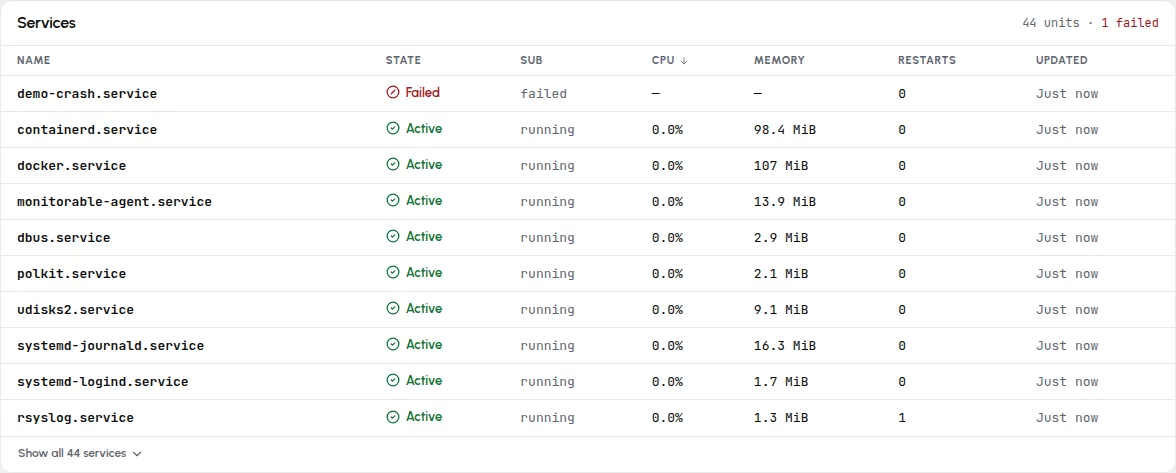
The header counts what the last snapshot saw — “43 units · 43 active” on a healthy server, “44 units · 1 failed” when something is wrong. Failed units always sort to the top, whatever column you sort by; the red Failed badge is the panel’s whole reason to exist.
| Column | Meaning |
|---|---|
| Name | The unit name, like nginx.service. |
| State | systemd’s load state: Active (green) or Failed (red). |
| Sub | The sub-state — running, exited for oneshots that completed, failed. |
| CPU | The unit’s CPU usage since the previous snapshot, on the whole-server 0–100% scale (not per-core). The first snapshot after an agent start shows — — there’s no previous sample to measure against yet. |
| Memory | The unit’s current memory, from its cgroup. |
| Restarts | How many times systemd has restarted the unit. |
| Updated | Age of the snapshot the row came from. |
Click Name, State, CPU, Memory, or Restarts to re-sort; the default is CPU, highest first.
Which units appear
Section titled “Which units appear”The snapshot covers .service units that are active, changing state, or
failed. A service that is stopped and supposed to be stopped isn’t
listed — the panel shows what’s running and what’s broken, not your unit
catalog. Per-unit fields and what is never read (unit files, command
lines, environments) are listed in
What the agent collects.
The detail sheet
Section titled “The detail sheet”Click any row for the unit’s full snapshot:
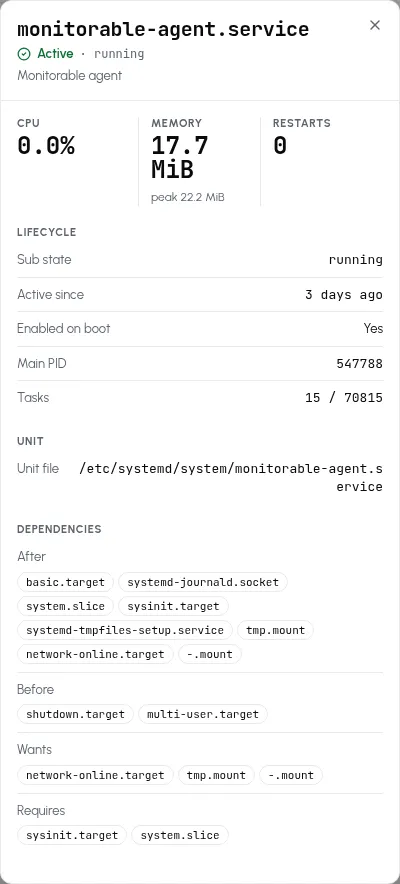
Beyond the table’s numbers, the sheet adds the memory peak, Active since, Enabled on boot, Main PID, Tasks (current against the unit’s limit), the Unit file path, and the unit’s dependency lists (After, Before, Wants, Requires). A failed unit has no main process anymore, so its sheet shows the failure state without a Main PID.
Alert when a service fails
Section titled “Alert when a service fails”The demo-crash failure above is what the Systemd unit failed rule catches, and Systemd restart loop covers the case a snapshot would miss. Both are on by default:
- Systemd unit failed fires as soon as a snapshot sees a
.serviceunit in the failed state, with an incident named after the unit — the failure above produced “Systemd unit demo-crash.service is in a failed state” within one snapshot cycle. The incident resolves on its own once the unit is back to active or has been cleaned up withsystemctl reset-failed. - Systemd restart loop fires when a unit’s restart counter climbs by 3 (the default, 1–50) within 30 minutes (the default window). That is how a service systemd keeps bringing back gets caught: a snapshot every 5 minutes can easily miss the moment it is failed, but the counter doesn’t. It is an event rule — one notification per occurrence, and the incident lands in the history already resolved.
The restart count, the window, and the channels either rule uses are
edited in the template: Set up one alert
has the clicks, and the edge cases, such as a transient unit cleaned up
with reset-failed while its incident is open, are under
Resolving, reopening, and removed entities.
Doing this with plain systemd
Section titled “Doing this with plain systemd”If you’d rather not run an agent, systemd itself can start one unit when
another fails. A template handler like this, saved as
/etc/systemd/system/notify-failed@.service, writes a line to the
journal; put your mail or webhook command in ExecStart instead:
[Unit]Description=Report that %i failed
[Service]Type=oneshotExecStart=/usr/bin/logger -t notify-failed "%i failed on %H"
Attach it to each service you care about with a drop-in
(systemctl edit nginx.service opens one):
[Unit]OnFailure=notify-failed@%n.serviceWhen the service fails, its journal shows the trigger, and the handler’s line lands under its own tag:
journalctl -u demo-crash.service --since "-5 min"Oct 26 15:11:46 web-01 systemd[1]: demo-crash.service: Main process exited, code=exited, status=1/FAILUREOct 26 15:11:46 web-01 systemd[1]: demo-crash.service: Failed with result 'exit-code'.Oct 26 15:11:46 web-01 systemd[1]: demo-crash.service: Triggering OnFailure= dependencies.journalctl -t notify-failed --since "-5 min"Oct 26 15:11:46 web-01 notify-failed[3061106]: demo-crash.service failed on web-01What this route leaves out: the handler runs one command per failure and
the journal is its only record, so there is nothing to look back on across
servers. Delivery is yours to build — logger only writes a line, and
mailing or posting from every server means a mail setup or a script on
each. With Restart= set, a crash-looping service passes through the
failed state on every attempt in systemd’s default restart mode, so the
handler runs on each crash until the start limit stops the restarts (five
runs in five seconds in this test, and the sixth failure, the one after
the start limit, ran no handler at all), and nothing tells a loop apart
from a single failure. The two rules above cover both cases and keep the
history in one place.