Compare
A hosted Beszel alternative for Linux servers
Last updated
Monitorable is a hosted server-monitoring service for Linux servers: one open-source OpenTelemetry agent per server, a dashboard with alerting, flat monthly pricing, and nothing to host.
Monitorable is a fully hosted alternative to Beszel for teams that want Linux server monitoring without running the monitoring hub themselves, with long-term metric history and managed alerting.
This page is for teams that want Linux server monitoring without running a monitoring hub. With Beszel, the hub is a server or container you run, update, back up and keep reachable for every agent; Monitorable hosts that part. Either way there is an agent on each server you monitor.
Switching to Monitorable means one command per server installs a standard OpenTelemetry Collector agent, there is no hub to run, per-minute data is kept for 35 days and hourly summaries for 400 days, and a default set of alert rules is on from the first minute. You give up self-hosting and free MIT-licensed software, Beszel's GPU, ZFS, battery and network-monitor coverage, its Windows, macOS and FreeBSD agents, and service and container logs next to the metrics. Monitorable is Linux only and runs no uptime checks.
At a glance
| Beszel | Monitorable | |
|---|---|---|
| Hosting model | Self-hosted. You run the hub, a web app built on PocketBase that serves the dashboard and keeps the data. | Hosted. The dashboard, storage and alerting run on our side. |
| What you run | The hub, as a binary or a container, plus an agent on each system. | An agent on each server, as a systemd service, outbound HTTPS only. Nothing central. |
| Metrics covered | Host CPU, memory, disk and disk I/O, network, load, temperatures, fans, GPU, battery, Docker and Podman containers, systemd services, SMART, ZFS, and ping, TCP, HTTP and DNS checks from the agents. | Host CPU, memory, disk, network, Docker containers, systemd services, SMART disk health, temperatures and listening ports, once a minute. |
| History | Fixed tiers: 1-minute detail for 1 hour, 8-hour averages for 30 days, nothing older. | Per-minute data kept 35 days, and any day of the last 32 within your plan's window opens minute by minute; hourly summaries kept 400 days; the dashboard looks back up to a year, by plan. |
| Alerting | 17 alert types, switched on per system or for all systems at once, each threshold averaged over a set number of minutes; every alert goes to all of the user's channels. | Default rules on from the first minute, edited in a template. Flapping conditions and restart loops stay one incident, reminders are capped per rule, each rule can go to its own channels, and an unacknowledged incident can escalate to a second set. Email, Telegram, Discord, Slack, PagerDuty, ntfy, Webhook. |
| Team access | Multiple users; admins share systems between them; OAuth and OIDC sign-in. | Organizations with members and roles; team size set by plan. |
| Operating systems | Agents for Linux, FreeBSD, macOS and Windows. | Linux only. |
| Price | Free and open source (MIT). You host and run the hub. | Lite: 3 servers free, no card, no time limit; paid plans priced per plan. See Pricing below. |
Which one to pick
Pick Beszel if…
- You want to self-host and keep the monitoring data on your own hardware.
- You want free, MIT-licensed software with no account anywhere.
- You monitor Windows, macOS or FreeBSD hosts, GPUs, ZFS pools or batteries.
- You want ping, TCP, HTTP and DNS checks from your own agents in the same tool.
- You want service and container logs next to the metrics.
Pick Monitorable if…
- You would rather not run a hub: no server to update, no backups to check, no certificates between agents and hub, nothing to watch the monitor.
- You want per-minute data kept for 35 days and hourly summaries for 400 days, with the dashboard's window set by plan.
- You want alert rules on from the first minute, incidents rather than single messages, per-rule channels, and escalation of an unacknowledged incident to a second set of channels.
- You want a standard, open-source OpenTelemetry Collector agent that never reads logs or file contents.
- You want a free hosted tier: 3 servers, no card.
Running it
With Beszel you run the hub and an agent on each system; with Monitorable you run only the agent.
Beszel. Install the hub, as a binary with a systemd service or as a container on port 8090, add each system in its web UI, and run the agent there with the key and token the hub gives you. Agents connect out to the hub over WebSocket, so if a reverse proxy sits in front of the hub it has to pass WebSocket connections; in SSH mode the hub connects in to each agent on port 45876 instead.
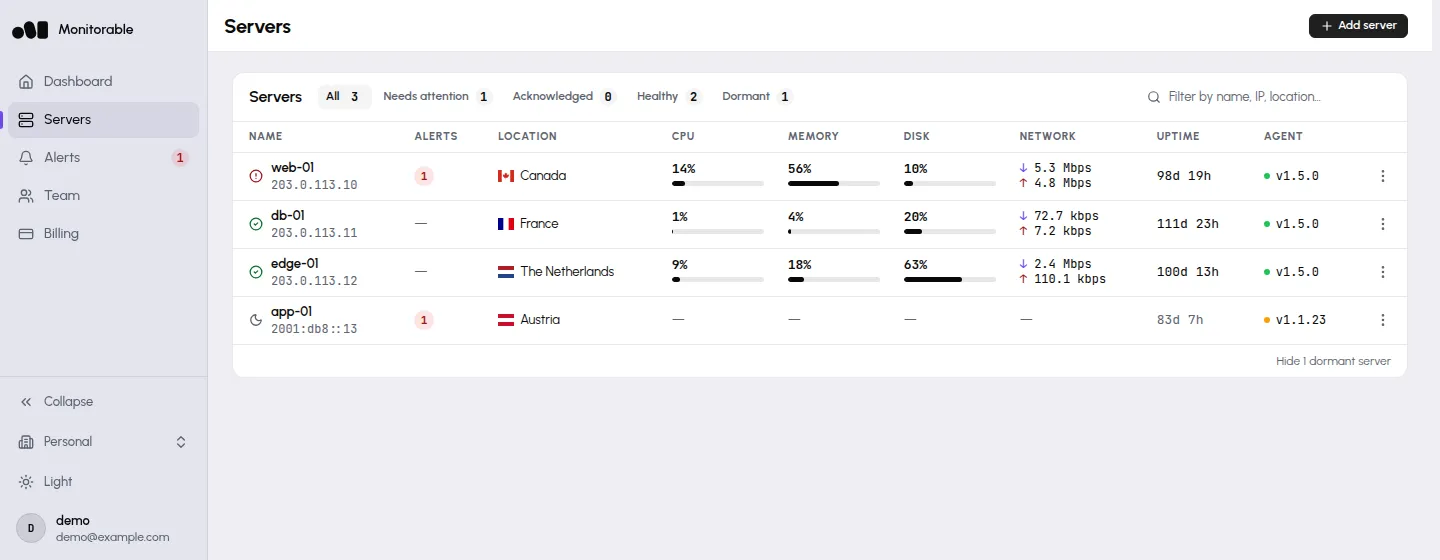
Monitorable. One command installs the agent as a systemd service. It reports once a minute over outbound HTTPS, opens no inbound port, accepts no remote commands and never reads logs or file contents. The dashboard, storage and alerting are hosted; there is no hub to run.
What you stop running when you switch
- Beszel. The hub itself: a server or container to update and keep reachable for every agent, and, if it sits behind a reverse proxy, one that passes WebSocket connections. source
Monitorable. Nothing. The dashboard is a URL, and the agents report to a public HTTPS endpoint. - Beszel. Backups of the hub's data directory, to disk or S3-compatible storage, and checking that they restore. source
Monitorable. Storage is sized, backed up and operated for you. - Beszel. Certificates between agents and hub: since v0.19.0 agents verify the hub's certificate, so if the hub uses a self-signed or private-CA certificate, that CA has to be configured on every agent. source
Monitorable. Agents talk to a public HTTPS endpoint with a publicly trusted certificate; there is nothing to distribute. - Beszel. Something outside the hub to tell you when the hub is down, which is what its HEARTBEAT_URL setting is for. source
Monitorable. Running and watching the service is our job.
Metric history
Beszel keeps 1-minute detail for 1 hour and 8-hour averages for 30 days; Monitorable keeps per-minute data for 35 days and hourly summaries for 400 days.
| Age of data | Beszel | Monitorable |
|---|---|---|
| Up to 1 hour old | 1 minute | 1 minute |
| 1 to 12 hours old | 10 minutes | 1 minute |
| 12 hours to 1 day old | 20 minutes | 1 minute |
| 1 to 7 days old | 2 hours | 1 minute |
| 7 to 30 days old | 8 hours | 1 minute |
| Over 30 days old | Deleted | 2-hour averages from hourly summaries kept 400 days |
Beszel. The hub rolls history up into five record types and deletes each after a fixed age: 1-minute records after 1 hour, 10-minute after 12 hours, 20-minute after 1 day, 2-hour after 7 days and 8-hour after 30 days. Data from last week is 2-hour averages, data from last month 8-hour averages, and nothing older is kept. No setting changes this.
Monitorable. Per-minute data is kept for 35 days, and any single day in the last 32 days opens minute by minute, within your plan's window. Ranges longer than a day draw hourly averages, and ranges longer than 30 days, or starting more than 32 days back, draw 2-hour averages from hourly summaries kept for 400 days.
How far back Monitorable's dashboard looks is set by the plan, up to a year. Beszel's tiers are fixed in the hub's code. See plans.
Alerting
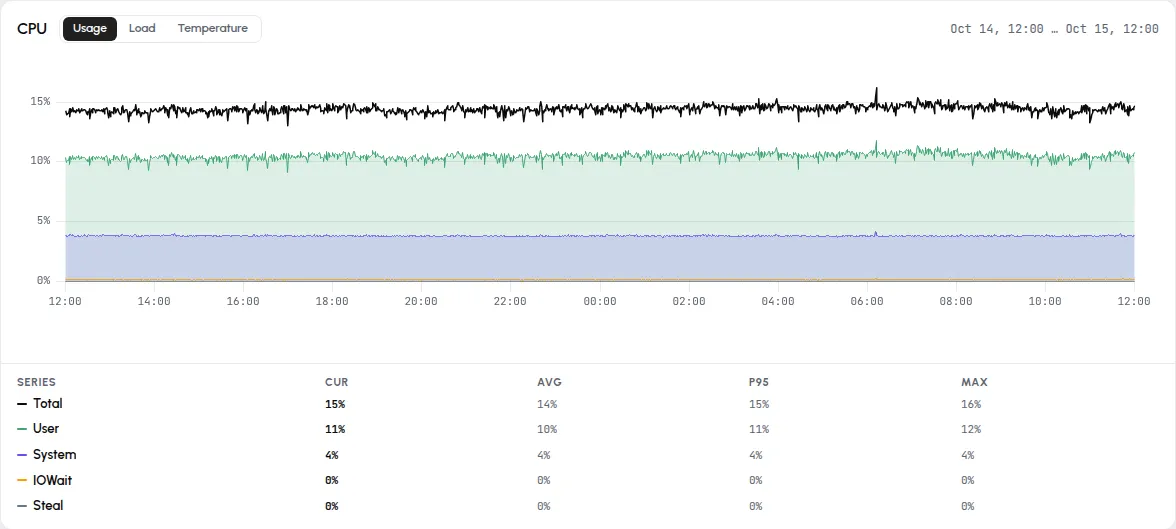
Both average a threshold over a window; Monitorable starts with rules on and adds incidents, per-rule channels and escalation.
Beszel. Beszel has 17 alert types: status, CPU, I/O wait, steal time, memory, disk, bandwidth, GPU, temperature, three load averages, battery, container health, failed services, network-monitor loss and certificate expiry. They are switched on per system, for all systems at once, or copied from another system; none is on until you switch it on, apart from an automatic notice when a disk's SMART status turns to warning or failed. A threshold is averaged over a set number of minutes, a notification goes out when it is crossed and again when it clears, quiet hours can silence notifications, and every alert goes to all of the user's email addresses and notification URLs, which cover 24 service types.
Monitorable. A default set of rules is on from the first minute, with your sign-in email as the first channel. Thresholds are averaged over a window and need two checks in a row. An alert resolves only once the value is clearly back under its threshold, a flapping condition or a restart loop stays one incident, reminders are capped per rule, and an agent that goes silent is itself an alert after five minutes. Each rule can go to its own channels, an unacknowledged incident can escalate to a second set of channels, and a server can be muted for a set time with a reason. Rules are edited in a template, and a template applies to every server assigned to it.
What each one measures
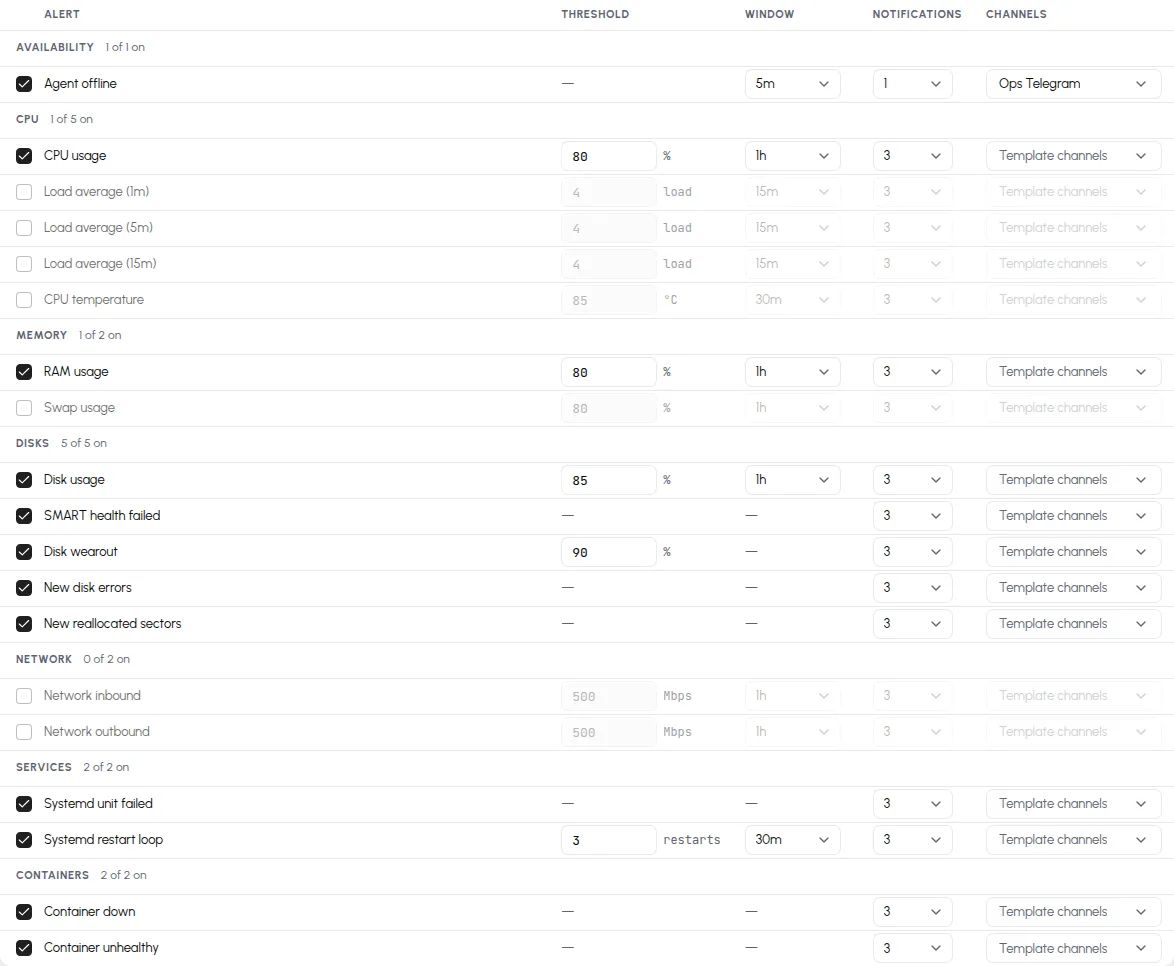
Beszel collects more kinds of data on more operating systems; Monitorable covers the Linux host, its containers, services, disks and listening ports.
Beszel. Beszel covers host CPU, memory (with swap and ZFS ARC), disk usage and I/O, network, load average, temperatures, fan speed, GPU usage and power for Nvidia, AMD and Intel, battery, Docker and Podman containers, SMART (including eMMC wear and mdraid), ZFS pools and datasets, systemd services with CPU, memory, restarts and the last 200 journal lines, and ping, TCP, HTTP and DNS checks probed from its agents every 30 seconds by default. It has agents for Linux, FreeBSD, macOS and Windows.
Monitorable. Monitorable reports host CPU, memory, disk, network, Docker containers, systemd services, SMART disk health, temperatures and listening TCP ports once a minute from a single agent, on Linux only. It collects no logs, traces or file contents.
Pricing
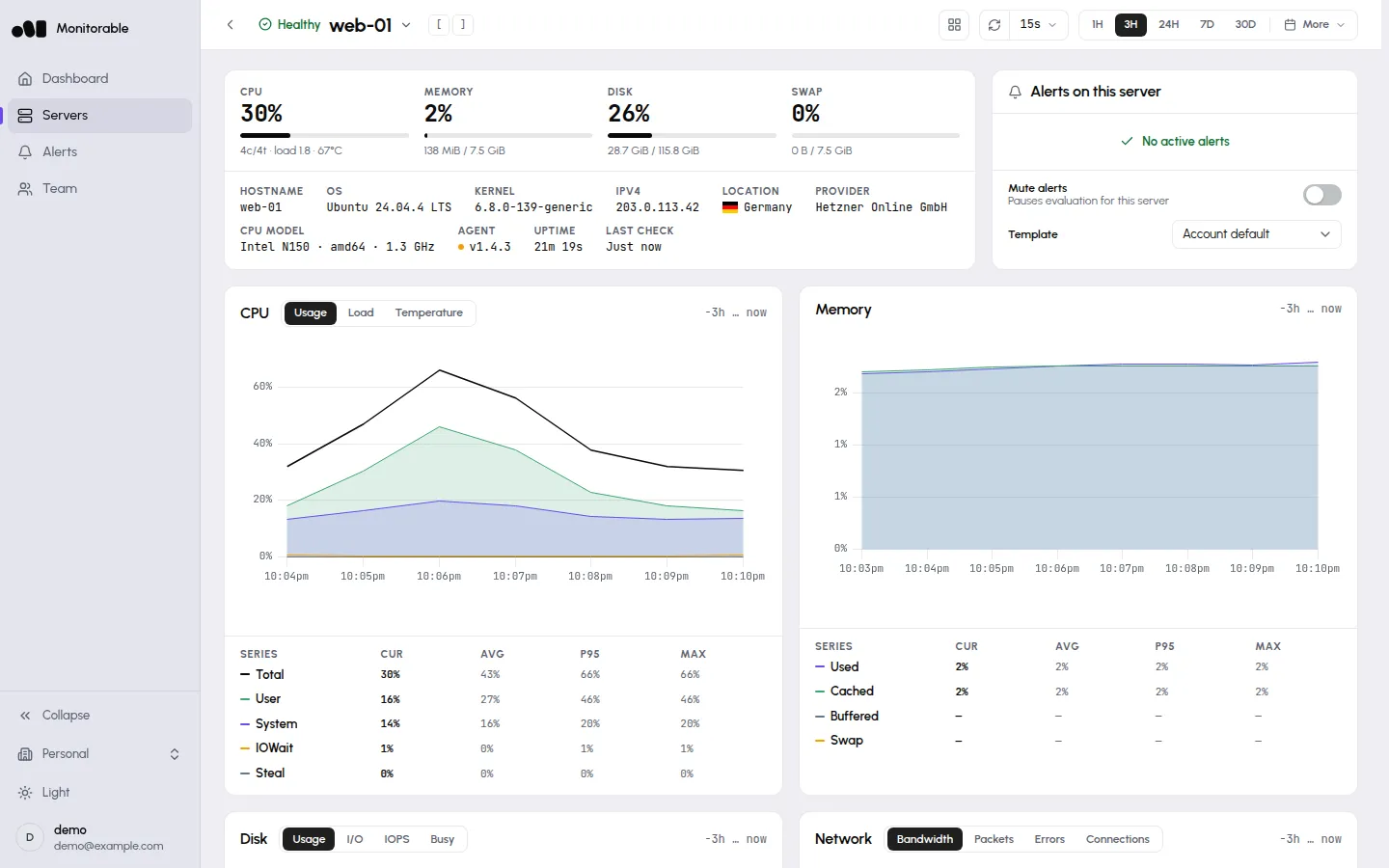
Beszel is free and open source under the MIT licence, and you host and maintain the hub yourself. Monitorable has a free hosted tier, Lite, for 3 servers with no card, and paid plans priced per plan rather than per server. See current plans and prices.
What Monitorable does not do
- No uptime, ping, TCP, HTTP or DNS checks and no status pages. Beszel's agents probe all four; Monitorable only sees what the agent reports from inside the server. Pair it with Uptime Kuma (self-hosted) or Hyperping (hosted) for checks and a status page.
- Linux only. No Windows, macOS or FreeBSD agent.
- No GPU, ZFS pool, battery or Wi-Fi metrics, and no list of pending package updates.
- No per-process or Kubernetes pod metrics.
- No logs, traces or application performance monitoring, so no service or container logs next to the metrics.
- No self-hosted edition. The dashboard, storage and alerting run on our side.
- No import of existing Beszel history. History starts when the agent first reports.
- The agent reports once a minute and "Agent offline" fires after five minutes by default. Detection in seconds is an uptime checker's job.
Monitorable vs Beszel
Is Monitorable a hosted Beszel?
No. It is a separate product with its own agent, a standard OpenTelemetry Collector, and it does not accept Beszel agents. It replaces the Beszel hub and agent pair with one agent per server and a hosted dashboard.
Is there a hosted version of Beszel itself?
The Beszel project does not offer one. ElfHosted, a third-party host with no stated affiliation to the project, lists the Beszel hub as a hosted app in early access (beta); you still install the agent on each server. Listing read on 2026-10-27. If you want Beszel itself without running the hub, that is the option to look at.
Can I run Beszel and Monitorable on the same server?
Yes. The two agents are separate services and do not interfere with each other, so running both while you compare is a reasonable way to switch.
Can I bring my Beszel history with me?
No. Monitorable's history starts when its agent first reports from a server.
Does Monitorable keep the data longer than Beszel?
Yes. Beszel keeps 1-minute detail for 1 hour and 8-hour averages for 30 days. Monitorable keeps per-minute data for 35 days, opens any day of the last 32 minute by minute within your plan's window, and keeps hourly summaries for 400 days; how far back the dashboard looks is set by plan, up to a year.
What does the Monitorable agent read on the server?
Host metrics and temperatures from the kernel, Docker through its socket, systemd over D-Bus, SMART from the disks and the list of listening TCP ports. It never reads logs, file contents, process lists, command lines or environment variables, and it sends everything out over HTTPS.
Is there a free plan?
Yes. Lite covers 3 servers with no card and no time limit, and paid plans are priced per plan rather than per server. The pricing section above links to the current plans.
Checked on 2026-10-27. Spotted a change? hello@monitorable.io.
Sources:
- https://beszel.dev/guide/what-is-beszel
- https://beszel.dev/guide/hub-installation
- https://beszel.dev/guide/common-issues
- https://beszel.dev/guide/agent-installation
- https://github.com/henrygd/beszel/releases/tag/v0.19.0
- https://beszel.dev/guide/environment-variables
- https://beszel.dev/guide/systemd
- https://beszel.dev/guide/network-monitors
- https://github.com/henrygd/beszel/blob/v0.21.1/internal/records/records_deletion.go
- https://github.com/henrygd/beszel/blob/v0.21.1/internal/site/src/lib/alerts.ts
- https://github.com/henrygd/beszel/blob/v0.21.1/internal/site/src/components/alerts/alerts-sheet.tsx
- https://github.com/henrygd/beszel/blob/v0.21.1/internal/alerts/alerts_system.go
- https://github.com/henrygd/beszel/blob/v0.21.1/internal/alerts/alerts_smart.go
- https://beszel.dev/guide/notifications
- https://github.com/henrygd/beszel/blob/v0.21.1/internal/alerts/alerts.go
- https://store.elfhosted.com/product/beszel/
- https://github.com/henrygd/beszel/blob/v0.21.1/LICENSE
Try it on one server
Sign in, add a server, and run the command it gives you. 3 servers free, no card.
curl --proto '=https' --tlsv1.2 -fsSL https://get.monitorable.net/install.sh | sudo sh -s -- --api-key=<key>